So, you have completed your video brief and it’s time to write the script. Here’s some useful tips to help you get started:
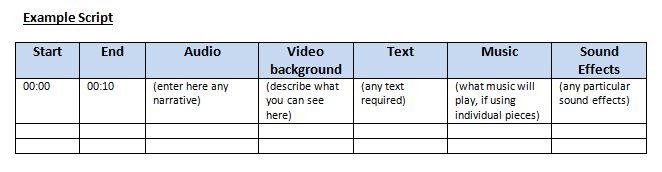
- Create a table with columns
Every video script contains at least two columns. The number of additional columns you create depends on how complex the project or the approval process is going to be. This detailed mapping of your project will keep production on-track and prevent post-production from becoming a nightmare.
- Visualise exactly what you see and hear
Describe what you see in the video column. Don’t skip the details. Write enough and in a way that an average person will also see what you see. Use a separate cell for each major location and subject matter change.
- Determine what the narrative audio track of the video will be
In some cases, there won’t be one. Usually this column includes narration or interview sound bites. If it’s narration, you should include the portion of the narration in an audio cell that corresponds to the listed video. Don’t place all of the narration in one cell, instead break it into segments. These can be either talking points or complete thoughts.
If the narrative is coming from interviews, then insert the question and make up a sound bite you’d like to hear.
- Fill in any additional columns
Text or Graphics
Impact text can be used as the video’s narrative. If a project has a lot of text and a lot of graphics, you’ll want to create two columns and change your page set up to landscape.
Music and Sound Effects
If you’re planning to have frequent music transitions and/or sound effects representing separate sections, you’ll want to add these columns. The more detailed you are now, the fewer headaches you’ll have later.
 LAB Marketing