Creating a Library
In days gone by, we would create a library in our offices and homes containing books, articles and news pieces we found of interest, in content marketing today, your library or swipe file may also consist of a drive on your computer network, a USB stick or an upload to the cloud of such pieces!
You should consider storing anything, whether physical or digital, which you feel could be used as inspiration for your own content. As a small business owner you won’t always have time to read through the content you come across while browsing, so a swipe file can be useful for saving relevant content that you can read later when time isn’t limited.
It is a good idea to keep a mix of physical and digital content. A physical swipe file allows you to include good copywriting from a wealth of different sources such as magazine clippings, newspaper ads, articles, reports and promos you might receive in the post!
Creating an Ideas Spreadsheet
The ideas spreadsheet is a straightforward spreadsheet with columns for:
- A rough outline of the idea.
- The form it will take: will it be a blog post, a video, a social media update, an infographic, etc.
- The title – this can change, but having a possible title does help shape the article.
- A column for notes, where you can expand on the idea, and make general notes relating to the content.
The spreadsheet is quite important, because although you are collecting content for ideas in your swipe file, the spreadsheet is where you start putting them together: giving them titles, matching them to specific personas, and identifying common themes. It can be a standalone document, but adding it as a separate worksheet on your objectives spreadsheet works better; that way all information relating to your content marketing strategy is kept together.
How to Generate Content Ideas
There are many ways you can generate ideas, as well as reading articles or hearing something on the radio, monitoring online content is obviously one of the best steps you can take in terms of looking for topics, and this can include:
- Setting up Google Alerts for selected keywords relevant to your industry and your audience. You can customise the options for these alerts to what works best for you, from the source, through to how frequently you receive them, what region(s) to include, and how many results are included.
- Setting up a traditional RSS feed of your favourite websites and topics.
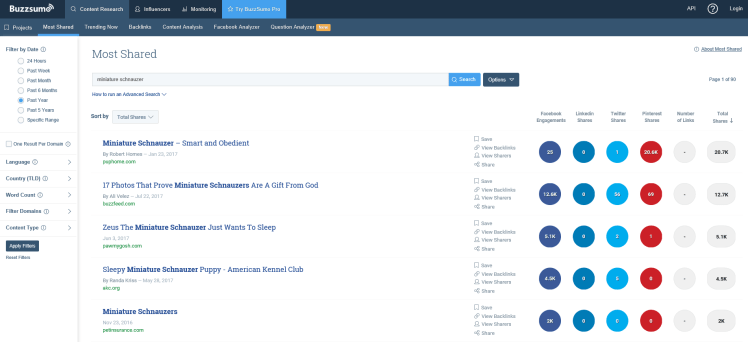
- Use Buzzsumo to search for popular content using keywords or URLs. Buzzsumo allows you to filter results, showing you how many times specific articles were shared across a variety of platforms. This gives you an idea of how in demand certain topics are, and allows you to see what type of content is most frequently shared. Here you can see I have produced a search based on my favourite dog breed!
- Pay attention to what people are talking about: strangers, your customers, social media, popular news sites. Ask yourself if any of what they are saying relates to your industry. Don’t latch onto trending topics just because they are trending, always first consider if it links to your industry in any way, and if so, how it could affect your business, and your target audience.
Whenever you select topics, always consider how they affect your business, your industry, and your target audience.
Find which of the above suggestions give you the best results, and then ensure you set aside time – at least once a week – to go through them, and add new ideas to your spreadsheet. Don’t be afraid of adding more ideas than you could possibly use; you will eventually find that some topics can be combined, while others will naturally rise to the top of your list by being more relevant to your target audience.
Creating a Content Calendar
Once you have all of the above in place, you need to create – and populate – a content calendar. Your ideas spreadsheet is a loose collection of ideas, while your content calendar shows exactly what content you are going to share, where you are going to share it, and when.
Whilst there are a host of online services offering content calendar solutions, most are designed for larger teams, and there is nothing wrong with using little more than a spreadsheet to plan your content posting. The spreadsheet should include the following:
- The day and date on which the post will be published.
- The type of content it is (video, Facebook update, infographic).
- The title or headline.
You may consider adding any of the following:
- The objective or goal, referencing the spreadsheet you compiled previously.
- Any keywords you are using in the content.
- The results of the post, e.g. the number of views, shares, comments and/or sales the post generated after being published.
The calendar should give you an overview of your content plan, allowing you to
- See any days/dates where you haven’t got any content lined up.
- Match content topics to specific events and/or holidays, such as National Dog Day! A list of such national days can be found at https://www.awarenessdays.com/ or https://www.daysoftheyear.com/
- See that your spread of content is balanced, and that it is relevant to specific buyer personas.
Conclusion
There are many ways to generate content ideas – from paying attention to your customers, to scouring the internet – but it is important that you find what works best for your business, and never stop adding new ideas to your idea spreadsheet. After all, you can never have too many ideas and by getting them all collated in one place you can start to build stories.
 LAB Marketing